Efficiency calibration for HPGe detectors
Determine the detector efficiency from an Excel dataset using a weighted third-order polynomial fit in logarithmic space.
Required Excel format
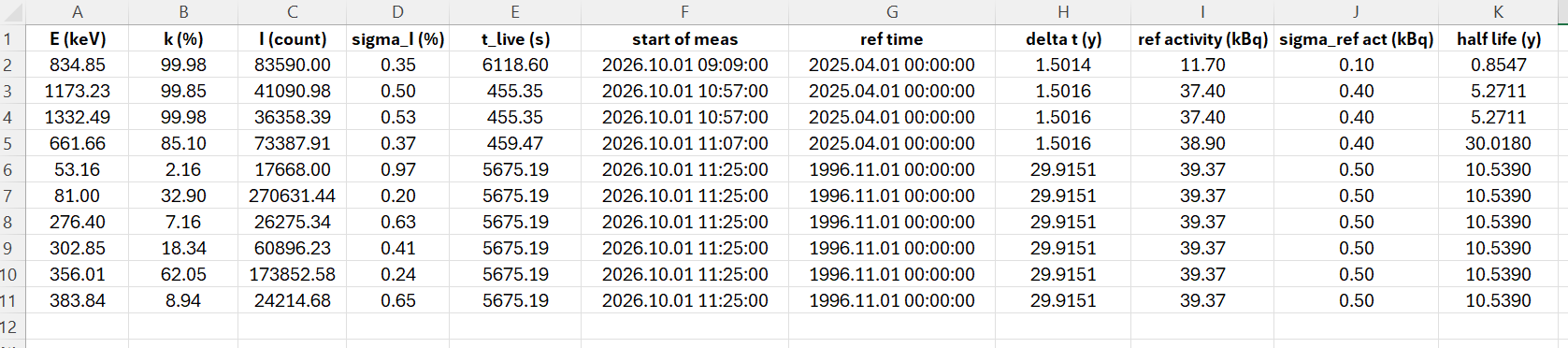
The Excel file must contain the measurement data in the following column order. The first row is treated as the header.
- Column 1: Energy [keV]
- Column 2: Gamma intensity, k [%]
- Column 3: Net peak area [count]
- Column 4: Relative uncertainty of N [%]
- Column 5: Live time [s]
- Column 6: Start of measurement [yyyy.mm.dd hh:mm:ss] (not needed)
- Column 7: Reference time of reference activities [yyyy.mm.dd hh:mm:ss] (not needed)
- Column 8: Time between ref. time and start of measurement [year]
- Column 9: Reference (initial) activity of calibration source [kBq]
- Column 10: Uncertainty of reference activity [kBq]
- Column 11: Half-life [year]
Process Excel file
No file selected
Existing efficiency calibrations
Select a calibration to open it. No Excel file is required.